Blue gradient and overview of various screens for the moble app ":Daysy"

24-HOUR DESIGNATHON

:Daysy

An emotion journaling app for children with Autism.

Blue gradient and overview of various screens for the moble app ":Daysy"

24-HOUR DESIGNATHON

:Daysy

An emotion journaling app for children with Autism.

Blue gradient and overview of various screens for the moble app ":Daysy"

24-HOUR DESIGNATHON

:Daysy

An emotion journaling app for children with Autism.

CONTEXT

Overview

I participated in CreateSC, USC’s annual UI/UX designathon, held from April 8th to April 9th, 2023. My team and I created “:Daysy,” an emotion journaling app specifically designed for children with Autism where we became finalists in the competition. 

DURATION

24-hours

24-hours

MY ROLE

UX Research

UX Design

Artist/Branding

UX Research

UX Design

Artist/Branding

TEAM

3 Designers

TOOLS

Figma

FigJam

Procreate

Google Docs

Figma

FigJam

Procreate

Google Docs

PROBLEM

How might we help those with commmunication disorders express themselves to increase their sense of community and belonging?

The theme for the Designathon was “Expressive Dialogue” with the challenge of: 

“Design a mobile app that will help those with communication disorders express themselves through creative digital mediums that can further help them build their sense of community and belonging.”

SOLUTION

:Daysy helps children with Autism express themselves in a simple but fun and engaging way.

“:Daysy” is a journaling app specifically designed to support children with Autism to encourage self-expression, communication, self-reflection, and emotional regulation. By tracking daily emotions and memories through daily rotating prompts and fun activities, ":Daysy" helps users share their feelings in an engaging and accessible way.

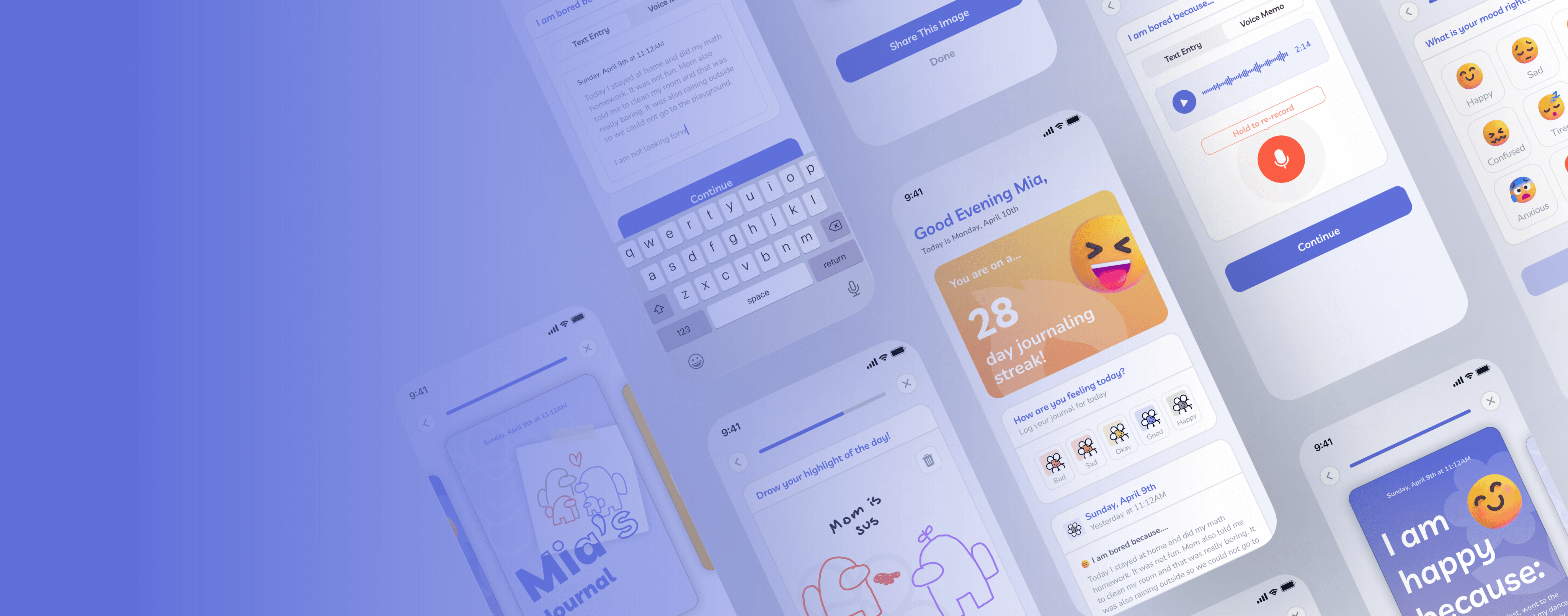
Blue gradient and overview of various screens for the moble app ":Daysy"

UNDERSTANDING THE PROBLEM

Expressive Dialogue can represent various ways to communicate ideas or thoughts with others.

When we received the prompt “Expressive Dialogue,” we started by brainstorming what Expressive Dialogue meant to us. We did this to understand the problem and identify existing ways of how people express themselves. Expressive Dialogue consists of various forms of communication including writing, art, images, and beyond. It is any means of conveying thoughts, whether for self-expression or interpersonal communication.
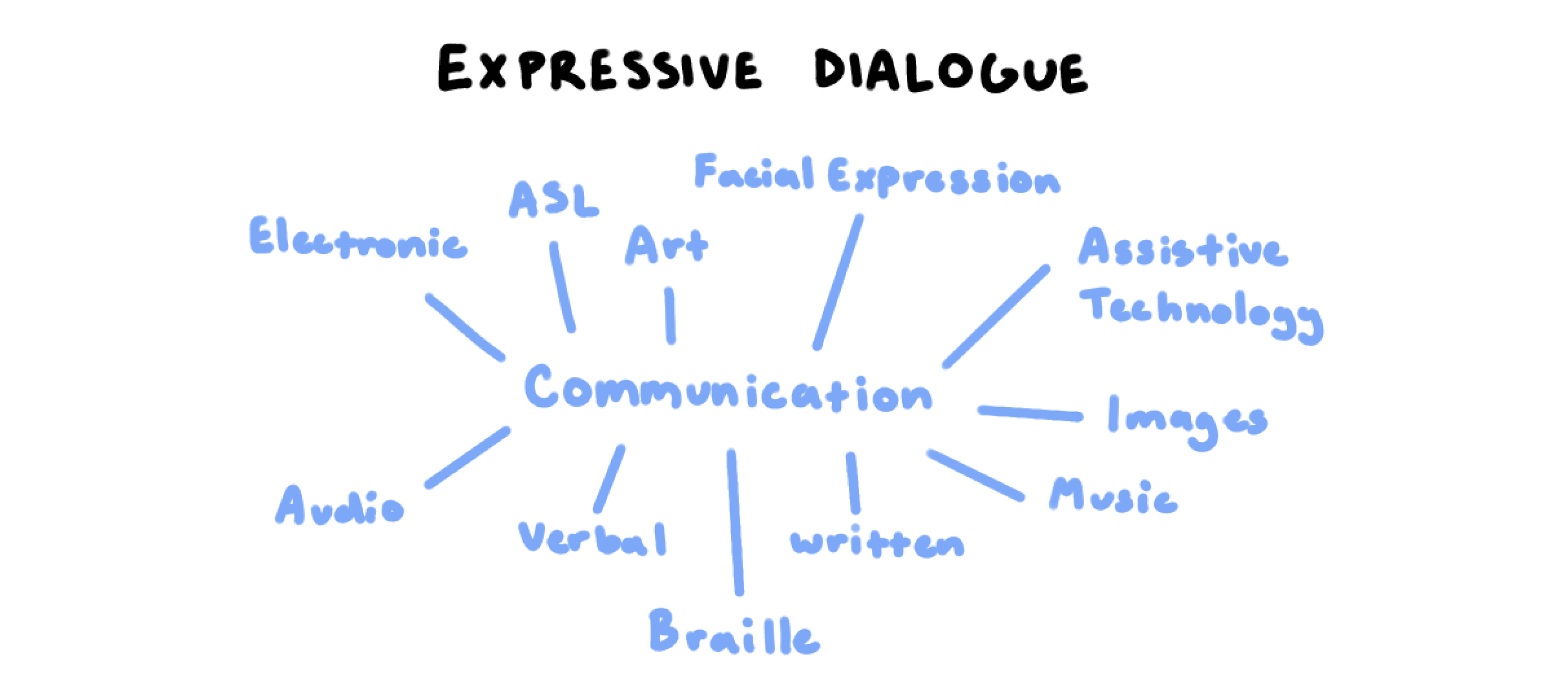
Brainstorming of ideas for expressive dialogue. In the middle it says communication and connected to it is electronic, asl, art, facial expression, assistive technology, images, music, wirtten, braille, verbal, audio.

Screenshot from our first whiteboarding session.

Screenshot from our first whiteboarding session.

Next, we thought about preexisting tools that help individuals with communication disorders express themselves. With this in mind, I thought of the emotion charts that children with Autism use to help them learn emotions.

Children with Autism often have difficulty recognizing and understanding emotions, which can make expressing their feelings challenging. Using these potential target users, we started conducting user research. 
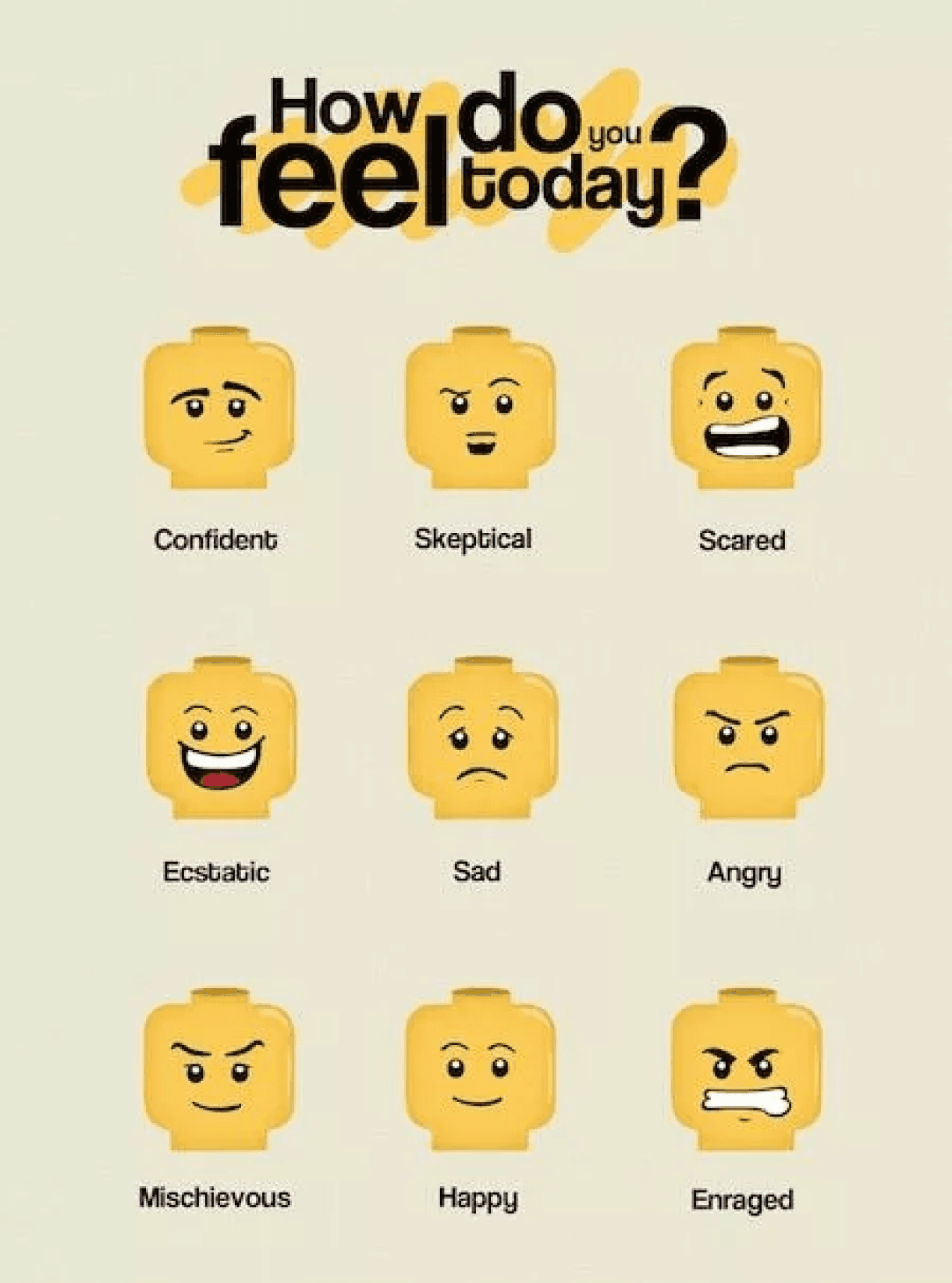
Emotion chart asking how do you feel today. There are various lego heads with emotions. The emotions are confident, skepital, scared, ecstatic, sad, angry, mischievous, happy, enranged

An example of an emotion chart.

USER RESEARCH

Understanding individuals with Autism better.

Before brainstorming or designing we wanted to understand individuals with Autism better to make sure we didn’t make any assumptions about our target audience. Drawing on my background from HuskyADAPT, an organization that specializes in inclusive play technology, I was familiar with conducting user research with various needs experts. I started to compile questions we wanted to ask during our interview maintaining an open perspective, and focusing on questions around communication.

INTERVIEW

It's important to keep things simple and understand that everyone is different.
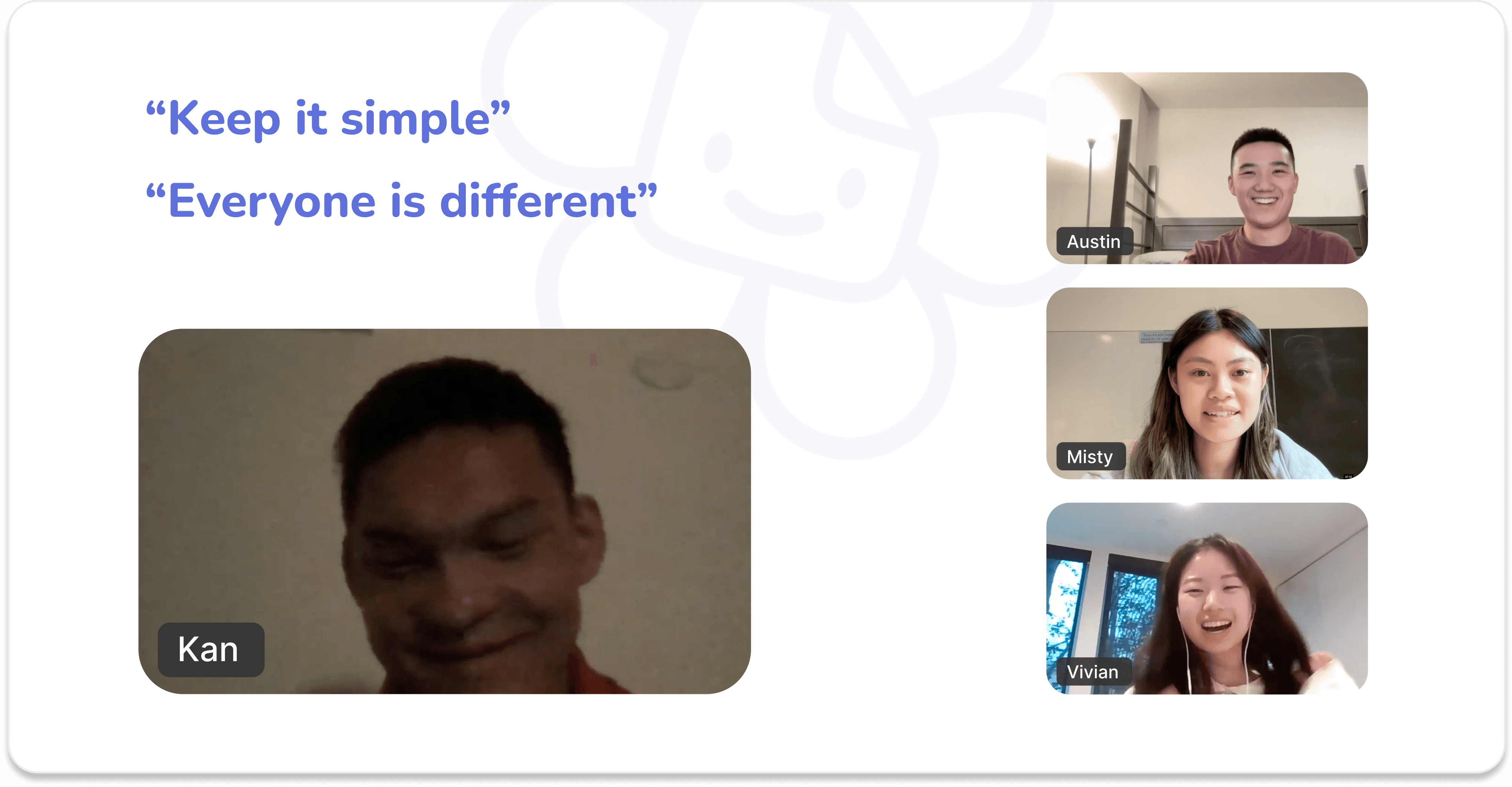
We reached out to our friend Kan, a college student at the University of Pacific that grew up with 2 sisters diagnosed with Autism Spectrum Disorder (ASD). After interviewing him, we got to understand the unique challenges his siblings face on a day-to-day basis. 

Some of the questions we asked Kan:

  • What are the most common challenges your siblings face when communicating with others?

  • How do your siblings communicate with you?

  • How do you communicate with your siblings?

  • Do your siblings use any tools to help them communicate?

And from that interview these we gathered 2 main insights:

We reached out to our friend Kan, a college student at the University of Pacific that grew up with 2 sisters diagnosed with Autism Spectrum Disorder (ASD). After interviewing him, we got to understand the unique challenges his siblings face on a day-to-day basis. 

Some of the questions we asked Kan:

  • What are the most common challenges your siblings face when communicating with others?

  • How do your siblings communicate with you?

  • How do you communicate with your siblings?

  • Do your siblings use any tools to help them communicate?

And from that interview these we gathered 2 main insights:

We reached out to our friend Kan, a college student at the University of Pacific that grew up with 2 sisters diagnosed with Autism Spectrum Disorder (ASD). After interviewing him, we got to understand the unique challenges his siblings face on a day-to-day basis. 

Some of the questions we asked Kan:

  • What are the most common challenges your siblings face when communicating with others?

  • How do your siblings communicate with you?

  • How do you communicate with your siblings?

  • Do your siblings use any tools to help them communicate?

And from that interview these we gathered 2 main insights:

image of our interview with kan. It reads "keep it simple" and "everyone is different" there is a picture of kan, austin, misty, and vivian (me)

Pictures of our interview with Kan.

1.

Keep it Simple - Complex text can pose a challenge for individuals with Autism when it comes to comprehension and reading, which is why it is important to keep things simple.

2.

Everyone is different - During our interview with Kan, he emphasized that his sisters were at different points on the Autism spectrum, and that each had their own distinct set of challenges and needs.

SECONDARY RESEARCH

Incorporating emotion charts.
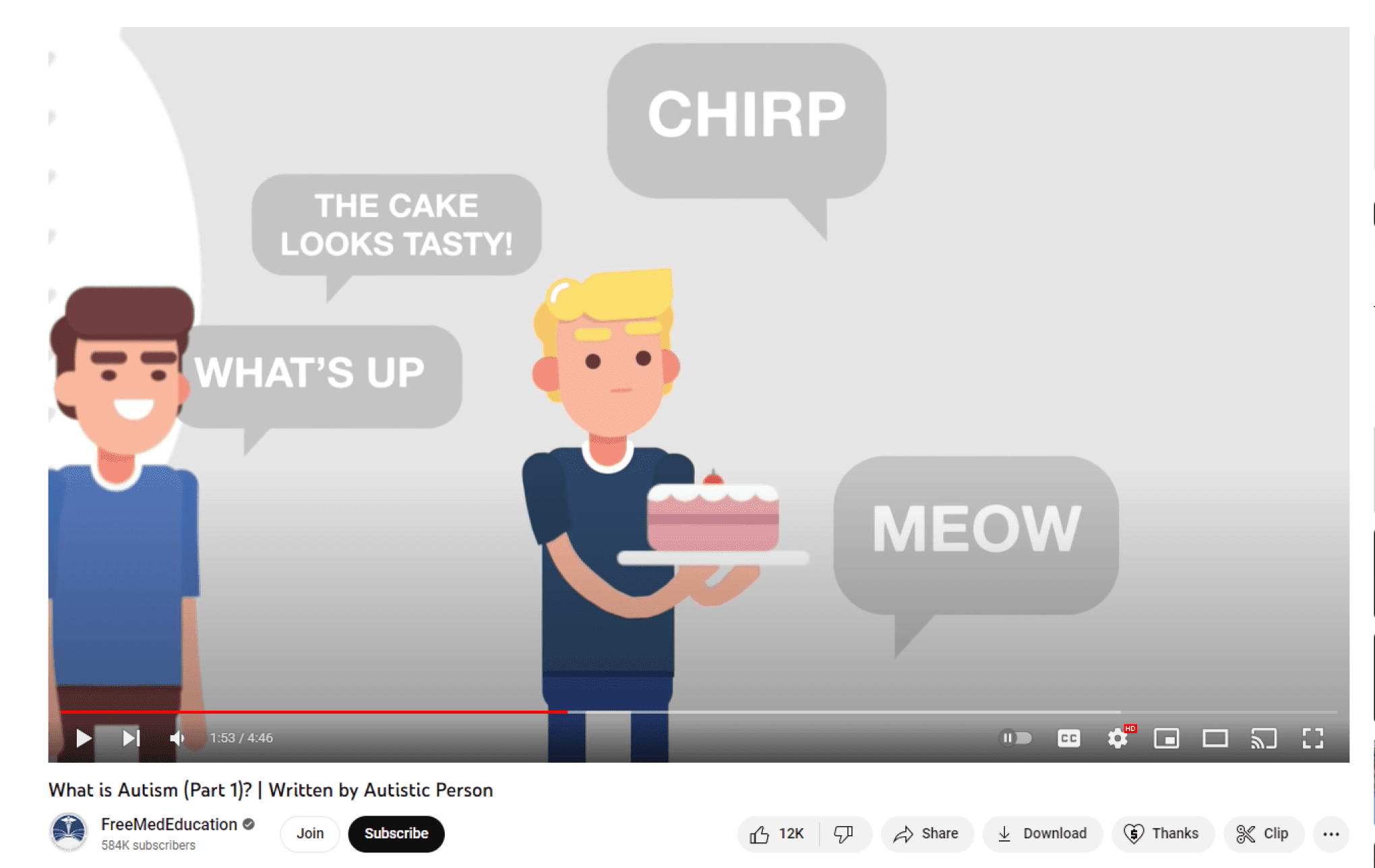
screenshot of the youtube video "what is autism" there is an image of someone holding a cake and another person smiling. The scene is overwhelming with many text bubble saying chirp, meow, what's up, the cake looks tasty

“What is Autism | Written by Autistic Person” by FreeMedEducation.

After our interview with Kan, we continued researching by looking into secondary sources such as articles and YouTube documentaries to understand what Autism is and what it may look like for others.

Using the insight from our interview and secondary sources, we decided that there might be a way to incorporate the concept of emotion charts. With feedback from Kan, he mentioned that having such a chart would be beneficial to his sisters.

Thus, we explored the idea of an emotion journaling app. 

COMPETITIVE ANALYSIS

There are no journaling apps catered specifically for the needs of individuals with Autism.

app icon of daylio
app icon of daylio
app icon of daylio
app icon of notion
app icon of notion
app icon of notion
app icon of the notes app

Daylio

Notion

Notes App

After conducting a competitive analysis, we discovered that many journaling and note taking apps like Daylio were confusing and difficult to use for users with Autism. These apps had overwhelming number of features making the app hard to navigate. On the other hand, other apps such as Notion and the Notes app were boring and unengaging for the user. Although there are apps that support children with Autism, the ones we found were either very out-of-date or did not cater specifically towards emotion journaling.

RE-FRAMING THE DESIGN QUESTION

How might we help children with Autism express and share their own emotions in a simple but engaging way?

IDEATION

Exploring the idea of an emotion based journaling app.

We started brainstorming on FigJam to get all our ideas down in one space. Using sticky notes and hand drawn wireframes, we explored various ideas for an emotion journaling app making sure to take our user research into consideration in our designs.

USER FLOW

Making the app simple but engaging and fun.

We wanted to maintain a simple routine journaling practice. With rotating self-reflection prompts, encouraging features, and fun activities such as drawing and image recognition, our app makes journaling fun while helping individuals with Autism practice sharing their emotions. Additionally, considering that individuals with Autism have different needs, users have the freedom to skip activities they don't want to do and have an option to share their journal with others.
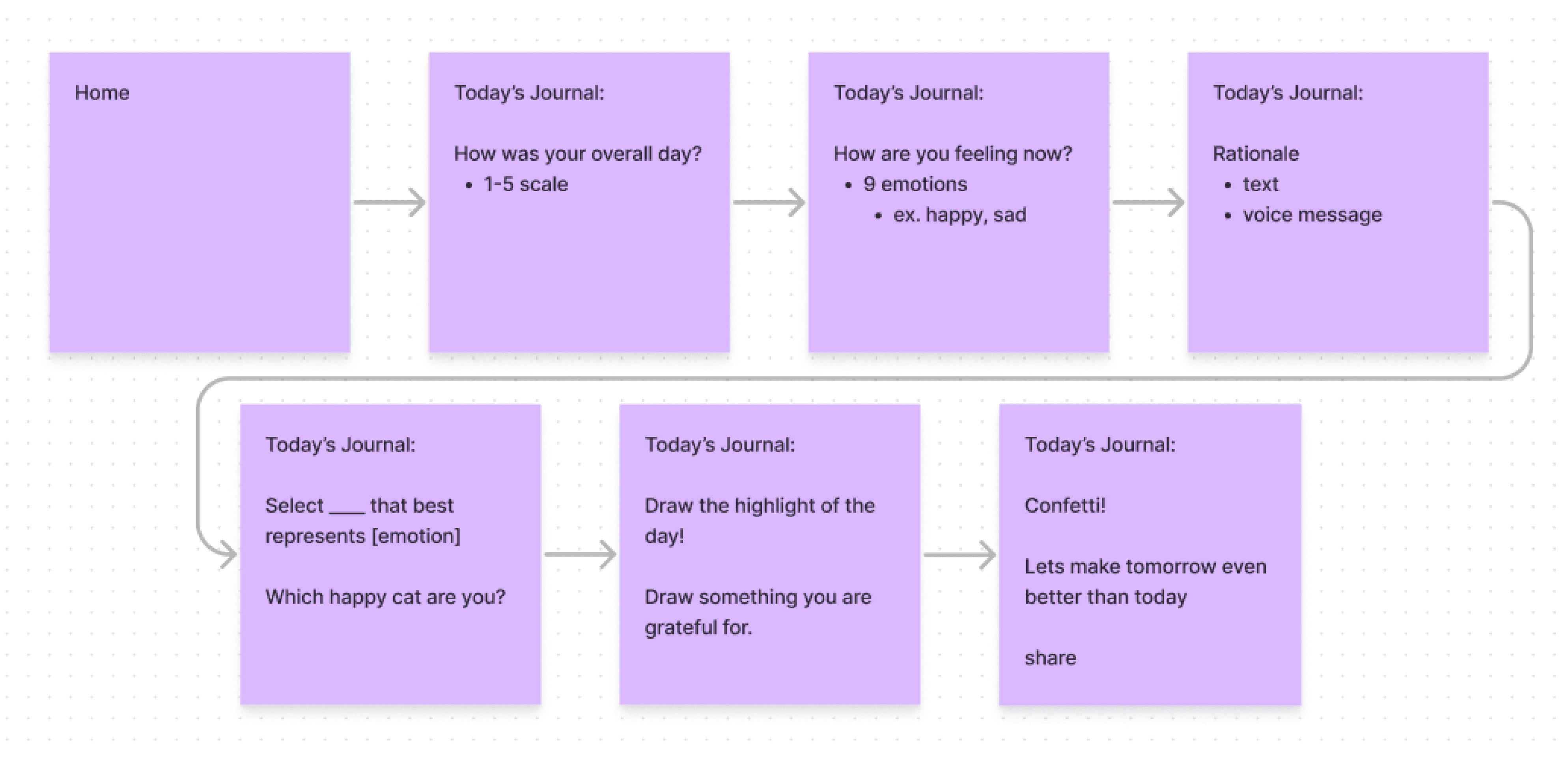
screenshot of our figjam user flow it starts at home and then goes to today's journal (how was your overall day? 1-5 scale) then today's journal (how are you feeling now? 9 emotions ex. happy, sad) and then today's journal rationale (text and vocice message) and then today's journal select blank that best represents emotion (which happy cat are you?) and then today's journal draw the highlight of the day or draw something you are greatful for. and then today's journal confetti! lets make tomorrow even better than today with the option to share.

Screenshot of our user flow of our app.

Screenshot of our user flow of our app.

SKETCHING/WIREFRAMING

Displaying user's data like a physical journal.

Following our user flow, we started to mock up what some of the screens could look like. Taking inspiration from a physical bullet journal, we wanted our users to be able to reflect on past entries. We explored various formats of displaying the user’s data whether it was a weekly view, monthly view, or yearly view. Furthermore, we integrated gamification features like streaks to encourage consistent daily journal entry completion, aligning with the familiar practice seen in bullet journaling.
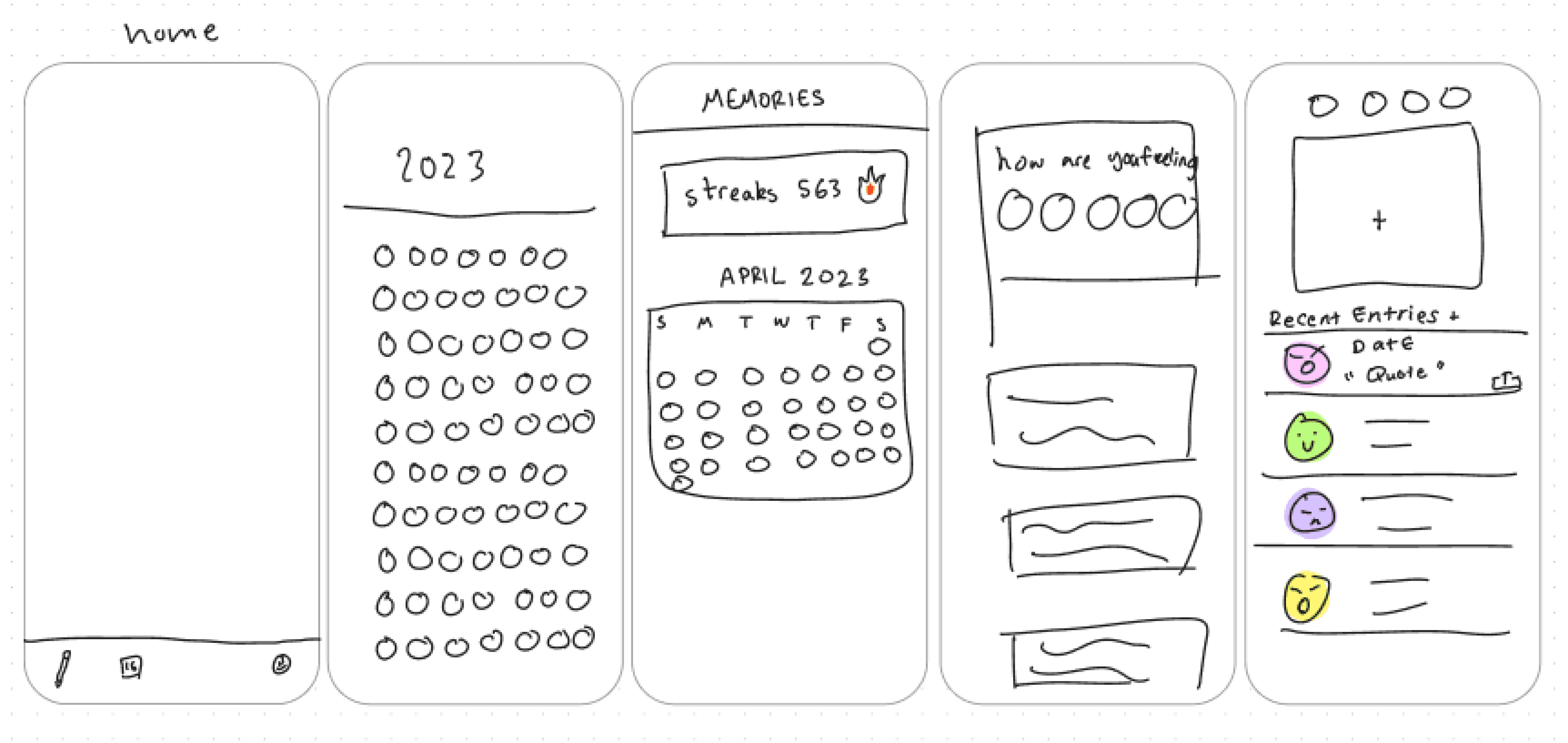
screenshot of our figjam hand drawn wireframes. there are wireframes of the home page and of looking at an overvieww of all user's emotions

Some of our hand drawn wireframes.

STYLE GUIDE

Keeping it clean and simple.
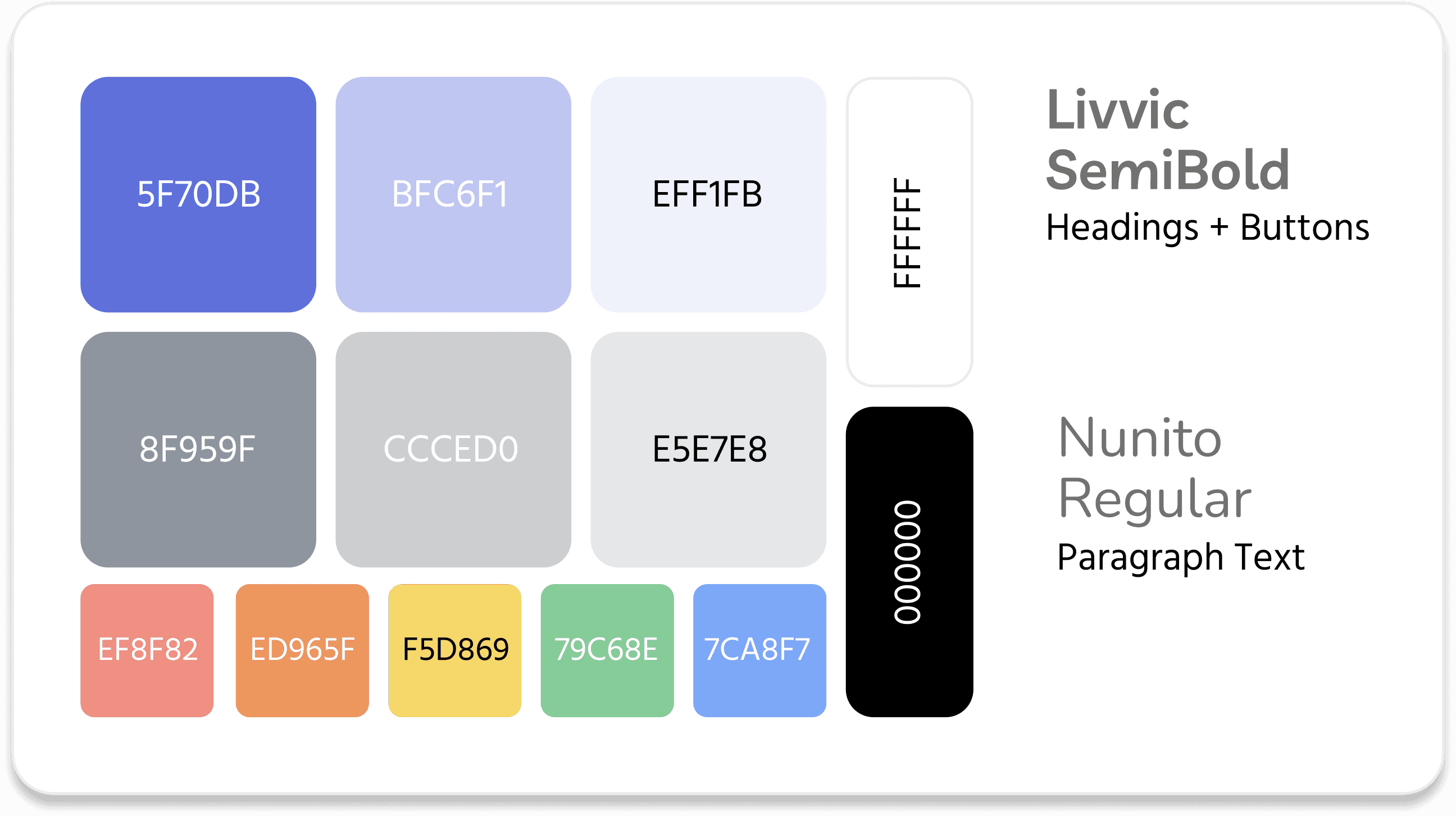
style guide of all the colors in the app.  a cool blue and gray are used for the most part and there is black, white, and rainbow color used too. The font livvic is used for headings and buttons and nunito is used for body text

Style guide of colors and fonts we used for our app.

Style guide of colors and fonts we used for our app.

We chose a simple blue and gray color scheme as our main colors to give our app a calming feel.

The other assortment of rainbow colors were used to represent various emotions and display user’s data in the calendar view, giving the app a pop of color.

We wanted to keep the app as simple and accessible as possible so we chose Livvic and Nunito, easy to read san serif fonts.

We chose a simple blue and gray color scheme as our main colors to give our app a calming feel.

The other assortment of rainbow colors were used to represent various emotions and display user’s data in the calendar view, giving the app a pop of color.

We wanted to keep the app as simple and accessible as possible so we chose Livvic and Nunito, easy to read san serif fonts.

We chose a simple blue and gray color scheme as our main colors to give our app a calming feel.

The other assortment of rainbow colors were used to represent various emotions and display user’s data in the calendar view, giving the app a pop of color.

We wanted to keep the app as simple and accessible as possible so we chose Livvic and Nunito, easy to read san serif fonts.

BRANDING

What is makes up :Daysy?

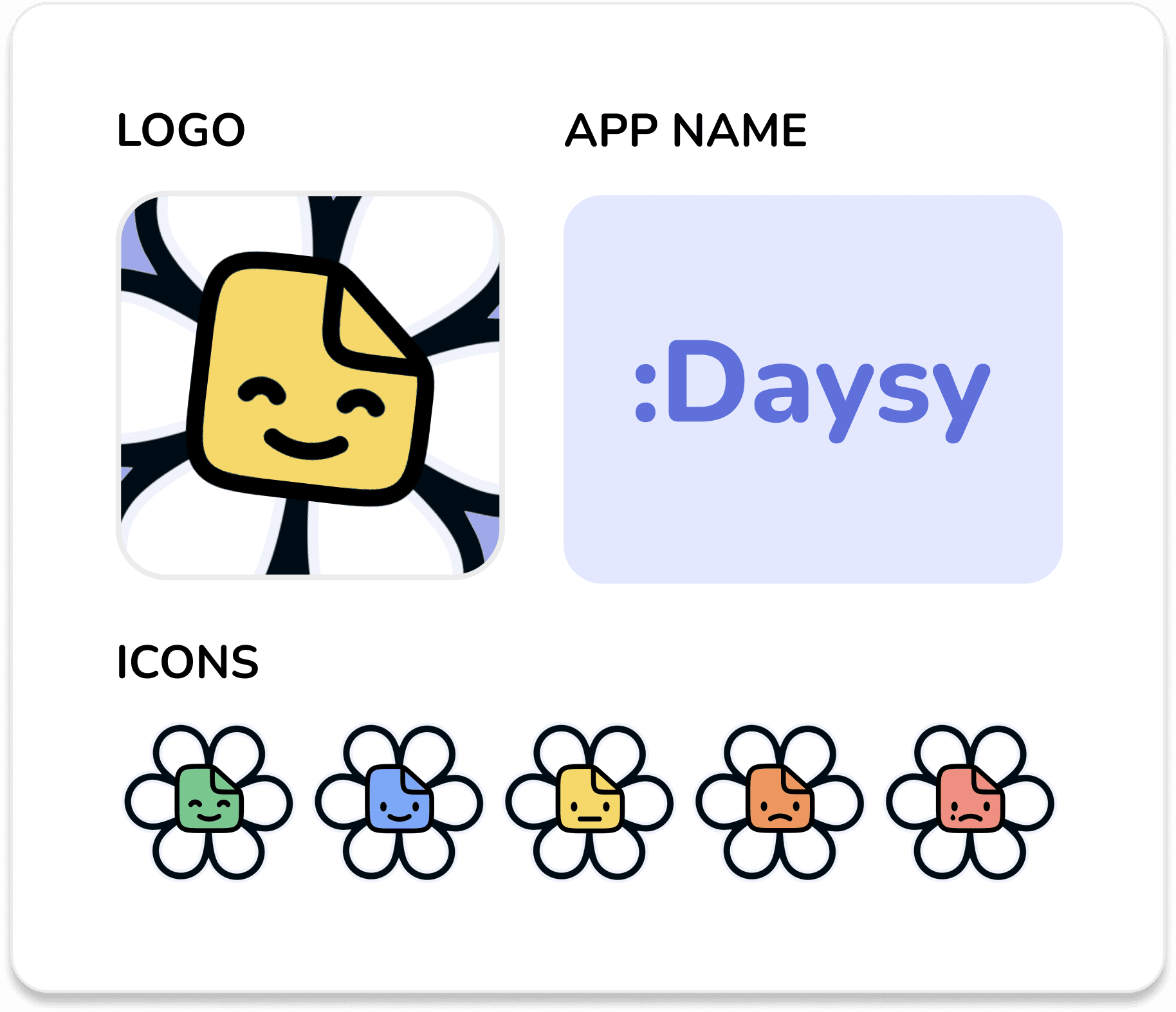
The main concepts behind the branding of “:Daysy,” are the flower “daisy” + emotion specific journaling. As the main artist, I focused on creating a playful but meaningful branding concept for :Daysy.

Our logo is a play on the daisy flower and a sticky note displaying an emotion as the center of the flower.

The app name “:Daysy” is a combination of the emoticon happy face “:D” + pronunciation of daisy + the spelling of DAY as in daily journal.

Our icons are various colored daisies signifying different emotions the user can choose from. Working in procreate, I was able to create icons for our app.

The main concepts behind the branding of “:Daysy,” are the flower “daisy” + emotion specific journaling. As the main artist, I focused on creating a playful but meaningful branding concept for :Daysy.

Our logo is a play on the daisy flower and a sticky note displaying an emotion as the center of the flower.

The app name “:Daysy” is a combination of the emoticon happy face “:D” + pronunciation of daisy + the spelling of DAY as in daily journal.

Our icons are various colored daisies signifying different emotions the user can choose from. Working in procreate, I was able to create icons for our app.

The main concepts behind the branding of “:Daysy,” are the flower “daisy” + emotion specific journaling. As the main artist, I focused on creating a playful but meaningful branding concept for :Daysy.

Our logo is a play on the daisy flower and a sticky note displaying an emotion as the center of the flower.

The app name “:Daysy” is a combination of the emoticon happy face “:D” + pronunciation of daisy + the spelling of DAY as in daily journal.

Our icons are various colored daisies signifying different emotions the user can choose from. Working in procreate, I was able to create icons for our app.

branding guide with the logo, app name, and icons are displayed. The logo is a yellow stickynote with a smile and white petals forming a daisy. the app name is :Daysy on a blue background and the icons are various colored stickynotes with different colored faces. the colors go green, blue, yellow, orange, and red ranging from very happy to upset

Branding guide for our app.

Branding guide for our app.

ITERATIONS

Changes we made along the way.

As we designed, we continuously thought back to our user research and interview with Kan.

1.
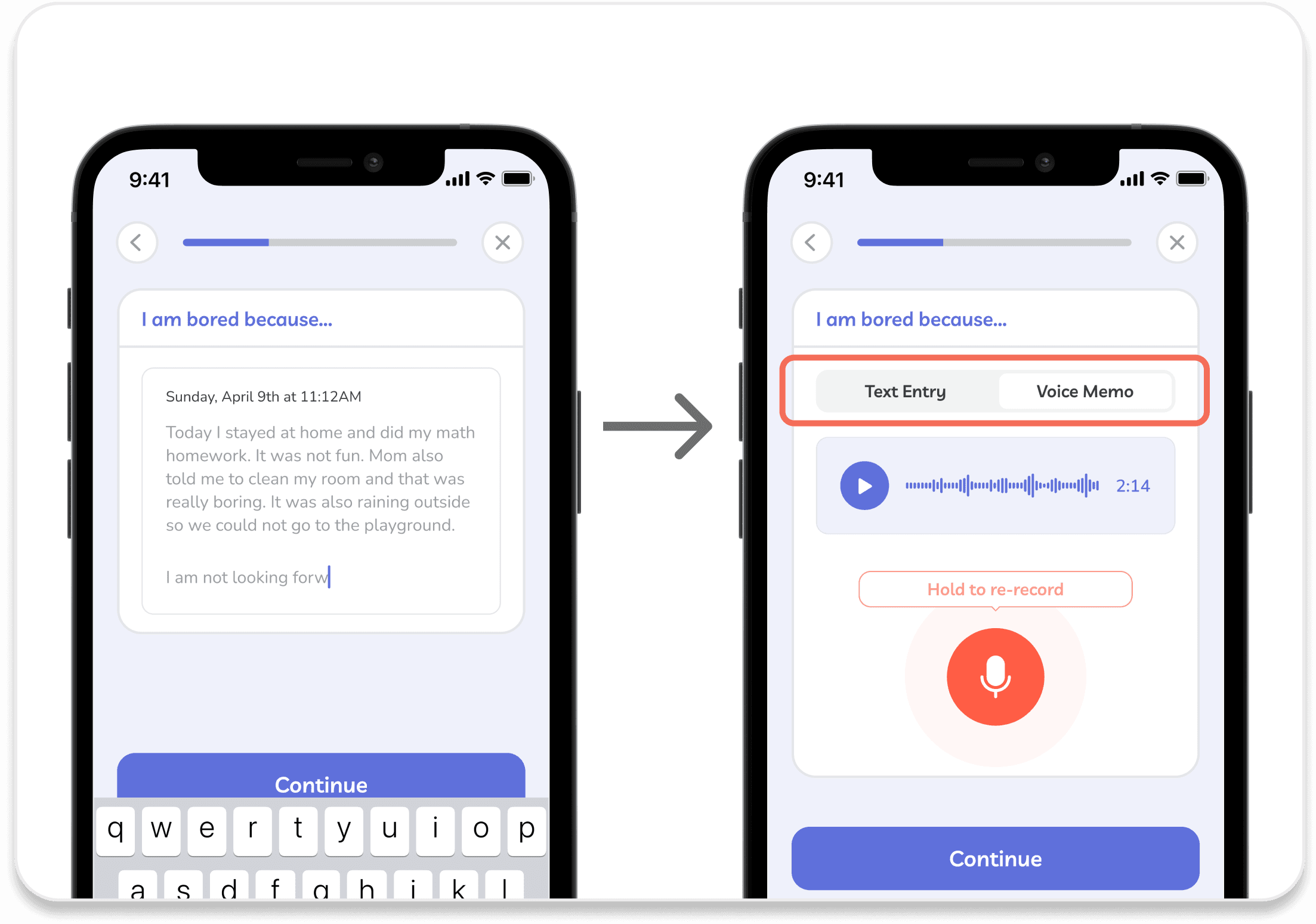
Adding voice memos for journal rationale. We recognized that typing and writing can pose challenges for many individuals with Autism and may hinder their ability to journal effectively. By including a voice memos, users have the option of recording their thoughts and emotions without struggling with the physical act of typing.


Adding voice memos for journal rationale. We recognized that typing and writing can pose challenges for many individuals with Autism and may hinder their ability to journal effectively. By including a voice memos, users have the option of recording their thoughts and emotions without struggling with the physical act of typing.

two screenshots displaying the addition of voice memos to the app
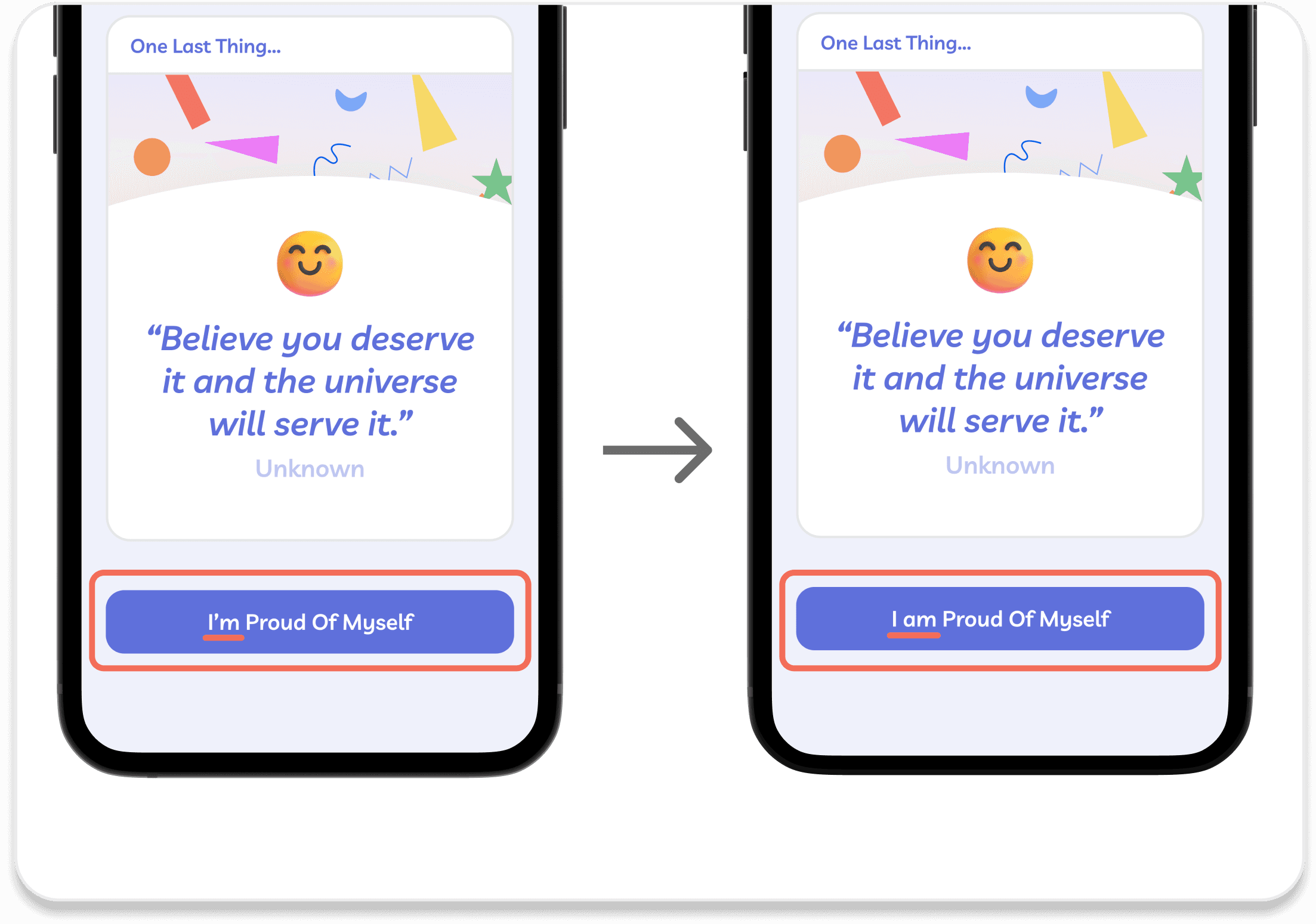
two screenshots displaying the removal of contractions. Instead of I'm the word now reads I am

2.

Removing contractions. We took into consideration that some individuals with Autism may have difficulty comprehending contractions. By removing contractions, we aimed to simplify the language and make the app more accessible for individuals with Autism.

FINAL DESIGN

:Daysy

“:Daysy,” is a journaling app specifically designed to support children with Autism to encourage self-expression, communication, self-reflection, and emotional regulation. By tracking daily emotions and memories through daily rotating prompts and fun activities, ":Daysy" helps users share their feelings in an engaging and accessible way. Meet our final product, “:Daysy”!
KEY FEATURES

CREATE A DAILY JOURNAL ENTRY

  • Gamification features such as streaks

  • Practice emotion journaling by logging daily entries + rationale to why the user is feeling that way

  • Fun rotating prompts such as choose which cat represents you + drawing activity

  • Optional shareable journal cards + skip button under each activity

Log in daily journal entry.

KEY FEATURES

CREATE A DAILY JOURNAL ENTRY

  • Gamification features such as streaks

  • Practice emotion journaling by logging daily entries + rationale to why the user is feeling that way

  • Fun rotating prompts such as choose which cat represents you + drawing activity

  • Shareable journal cards

Log in daily journal entry.

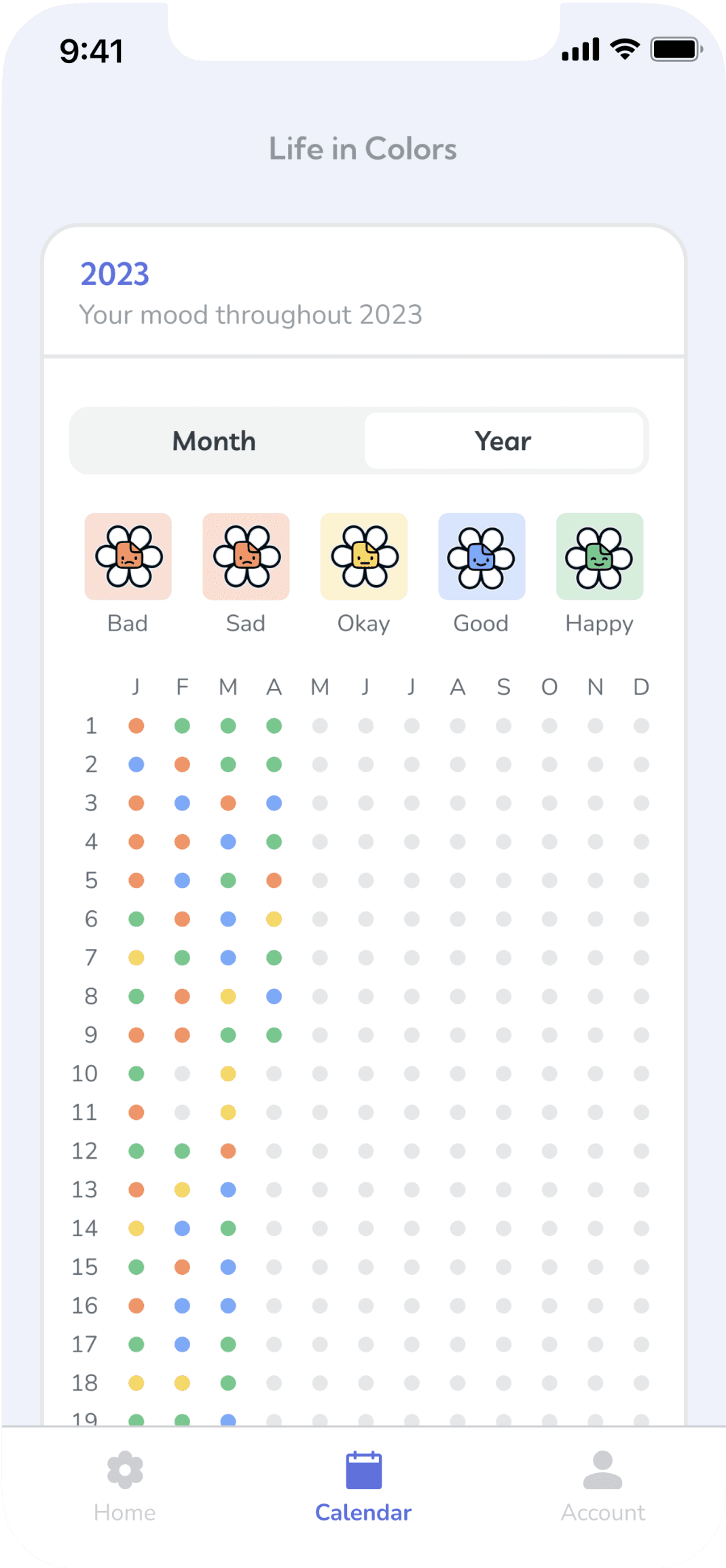
Screenshot of the app of it's calendar view. there is a month or year view. In the year view it has all the days of the year lined up as differnt colored dots

Calendar view.

VIEW YOUR LIFE IN COLORS

  • User’s yearly data displayed as various colored dots representing the emotions they logged (similar to a bullet journal)

  • User’s yearly data displayed as various colored dots representing the emotions they logged (similar to a bullet journal)

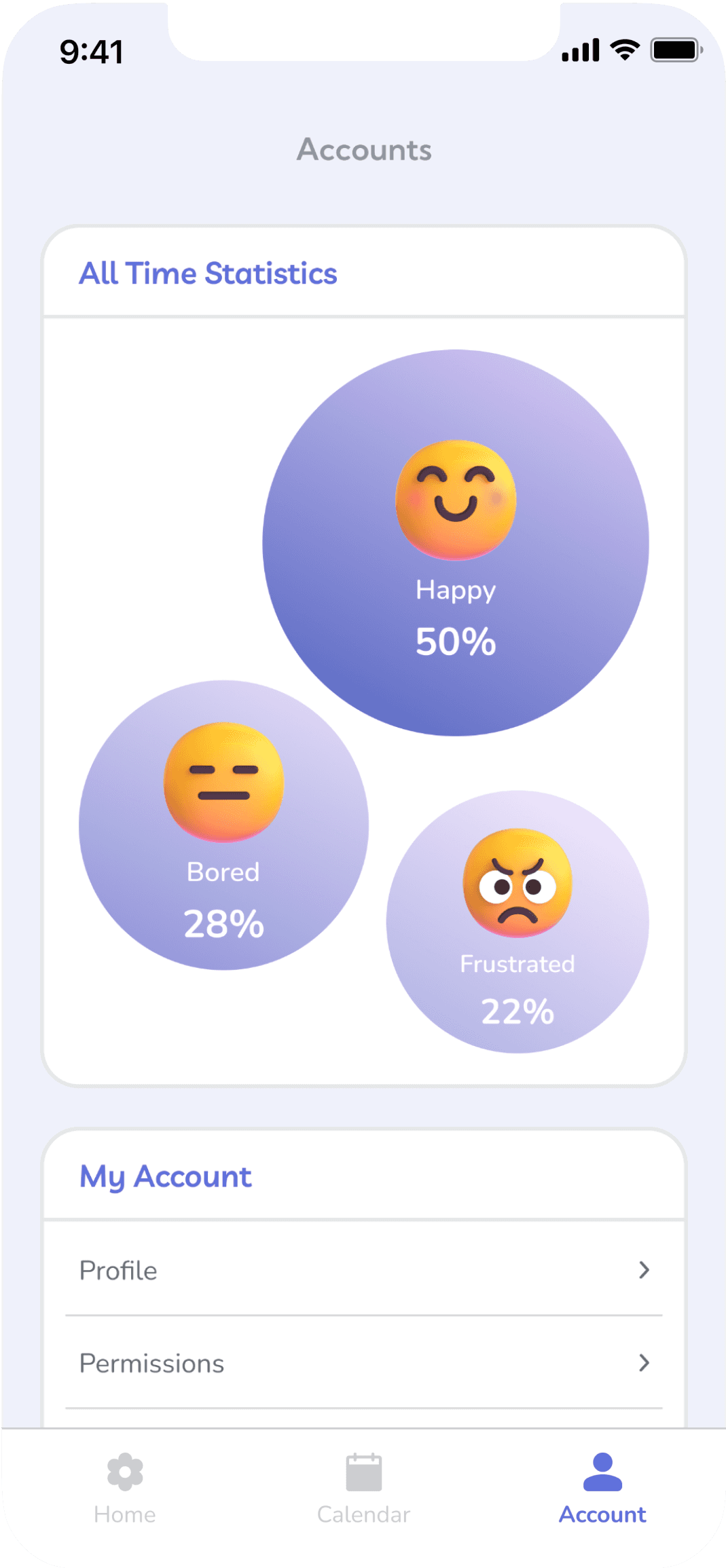
ACCOUNT SETTINGS

  • User’s all time stats displayed as various sized circles depending on which emotions were logged the most

  • Customize account settings

  • User’s all time stats displayed as various sized circles depending on which emotions were logged the most

  • Customize account settings

screenshot of the account settings page. It shows an all time statistics with various sized blobs, happy being the biggest one at 50% then bored at 28% and then frustrated at 22%. there are also settings for the account such as prifile and permissions

Account settings.

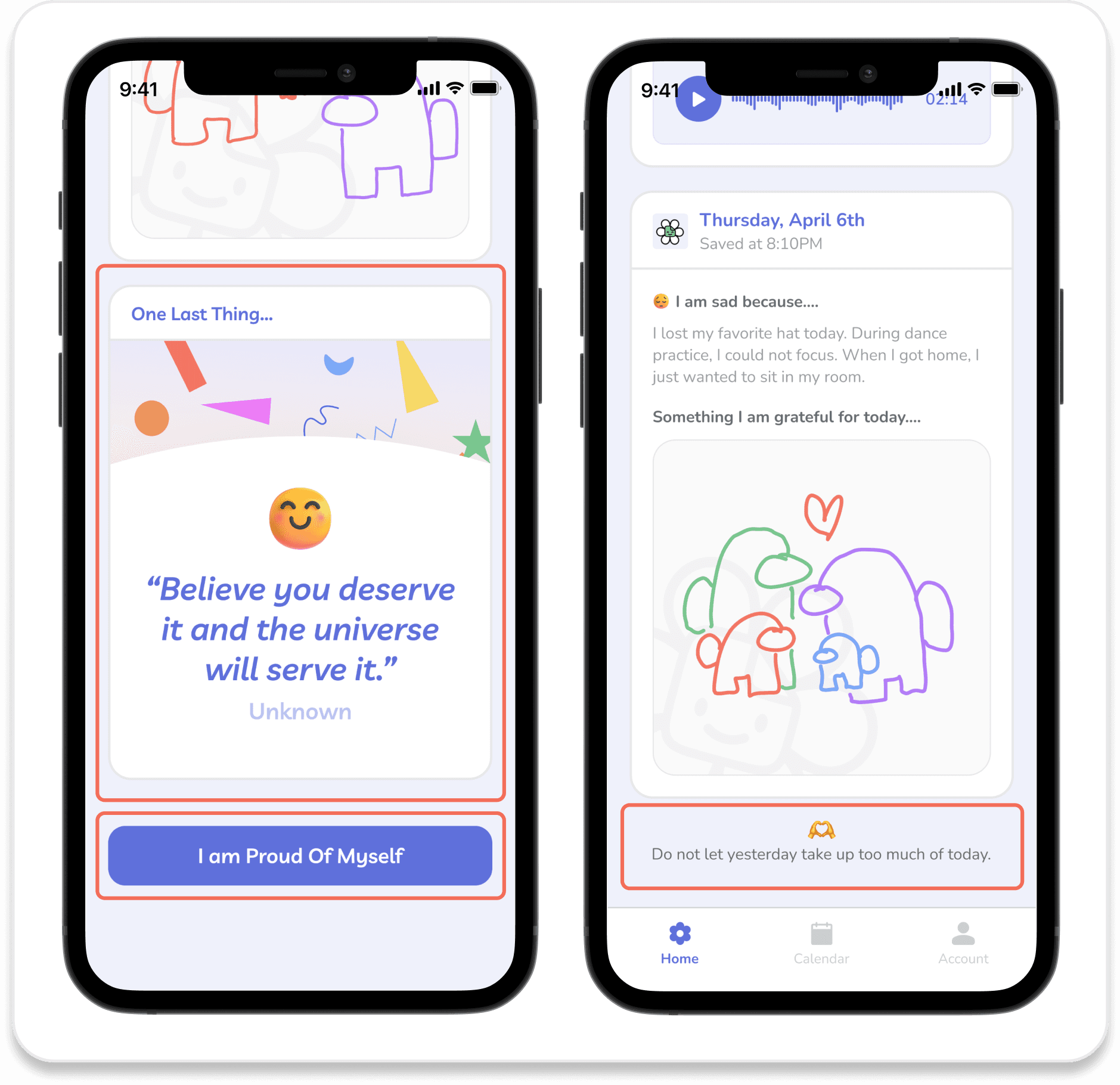
screenshots of different parts of the app with fun features. Left is displaying a inspiring quote "believe you deserve it and the universe will serve it" and the button reads "I am proud of myself" on the right is the bottom of the home page which has a heart emoji and reads "do not let yesterday take up too much of today"

Fun little features we included.

OTHER FEATURES

  • Inspiring quote at the end of each journal entry

  • Positive message on the “complete” button when finishing a daily journal

  • Small encouraging notes at the bottom of pages

  • Inspiring quote at the end of each journal entry

  • Positive message on the “complete” button when finishing a daily journal

  • Small encouraging notes at the bottom of pages

REFLECTION

What I learned.

Practice makes perfect. Given that this was my first designathon and first time working with Austin and Misty for a design project, I am extremely proud of my team for becoming finalists. With that being said, from the research, design, branding, prototyping, and presentation it was very overwhelming as we did not consider everything we had to come up with during the 24-hour time period. After going through the process and seeing the other finalist teams present, I am confident the next time around we can make an even better app and place higher in future competitions.

User research is critical for design decisions. After our interview with Kan, I realized how valuable getting user input is to our design process. Since we did not have much experience interacting with individuals with Autism, talking to someone that has was very helpful. Learning his sisters’ frustrations gave us painpoints to start from and think of ideas. In addition, being able to get feedback on our ideas from Kan gave us direction to see if our design was valid or not. 

Learning from my teammates. After working with Austin and Misty, I recognized that we brought different skills and perspectives to the team. While working on this project I was able to learn how to create components, high-fidelity interactions, and a whole bunch of other features in Figma I was unfamiliar with!

Awards we recieved!

We were awarded as a finalist (top 8 teams out of ~ 60 teams) and presented at the finale!

screenshot of slide as a finalist "crafty crew" presenting our app ":Daysy" from the university of washington

Our introduction slide as Finalist "Crafty Crew" presenting our app ":Daysy."

Next steps?

Currently we do not have plans to continue “:Daysy.” With more time, we would have liked to conduct more user interviews and perform user testing to make improvements to the app. However, who knows? Maybe if we have extra free time we will revisit “:Daysy” and bring it to life!

Thank you for making it to the end :D

REFLECTION

What I learned.

Practice makes perfect. Given that this was my first designathon and first time working with Austin and Misty for a design project, I am extremely proud of my team for becoming finalists. With that being said, from the research, design, branding, prototyping, and presentation it was very overwhelming as we did not consider everything we had to come up with during the 24-hour time period. After going through the process and seeing the other finalist teams present, I am confident the next time around we can make an even better app and place higher in future competitions.

User research is critical for design decisions. After our interview with Kan, I realized how valuable getting user input is to our design process. Since we did not have much experience interacting with individuals with Autism, talking to someone that has was very helpful. Learning his sisters’ frustrations gave us painpoints to start from and think of ideas. In addition, being able to get feedback on our ideas from Kan gave us direction to see if our design was valid or not. 

Learning from my teammates. After working with Austin and Misty, I recognized that we brought different skills and perspectives to the team. While working on this project I was able to learn how to create components, high-fidelity interactions, and a whole bunch of other features in Figma I was unfamiliar with!

Awards we recieved!

We were awarded as a finalist (top 8 teams out of ~ 60 teams) and presented at the finale!

screenshot of slide as a finalist "crafty crew" presenting our app ":Daysy" from the university of washington

Our introduction slide as Finalist "Crafty Crew" presenting our app ":Daysy."

Next steps?

Currently we do not have plans to continue “:Daysy.” With more time, we would have liked to conduct more user interviews and perform user testing to make improvements to the app. However, who knows? Maybe if we have extra free time we will revisit “:Daysy” and bring it to life!

Thank you for making it to the end :D

REFLECTION

What I learned.

Practice makes perfect. Given that this was my first designathon and first time working with Austin and Misty for a design project, I am extremely proud of my team for becoming finalists. With that being said, from the research, design, branding, prototyping, and presentation it was very overwhelming as we did not consider everything we had to come up with during the 24-hour time period. After going through the process and seeing the other finalist teams present, I am confident the next time around we can make an even better app and place higher in future competitions.

User research is critical for design decisions. After our interview with Kan, I realized how valuable getting user input is to our design process. Since we did not have much experience interacting with individuals with Autism, talking to someone that has was very helpful. Learning his sisters’ frustrations gave us painpoints to start from and think of ideas. In addition, being able to get feedback on our ideas from Kan gave us direction to see if our design was valid or not. 

Learning from my teammates. After working with Austin and Misty, I recognized that we brought different skills and perspectives to the team. While working on this project I was able to learn how to create components, high-fidelity interactions, and a whole bunch of other features in Figma I was unfamiliar with!

Awards we recieved!

We were awarded as a finalist (top 8 teams out of ~ 60 teams) and presented at the finale!

screenshot of slide as a finalist "crafty crew" presenting our app ":Daysy" from the university of washington

Our introduction slide as Finalist "Crafty Crew" presenting our app ":Daysy."

Next steps?

Currently we do not have plans to continue “:Daysy.” With more time, we would have liked to conduct more user interviews and perform user testing to make improvements to the app. However, who knows? Maybe if we have extra free time we will revisit “:Daysy” and bring it to life!

Thank you for making it to the end :D

Check out my other projects!

Check out my other projects!

Thumbnail of Ancestry casestudy.

PRODUCT DESIGN

Creating user-centered experiences using data-driven insights.

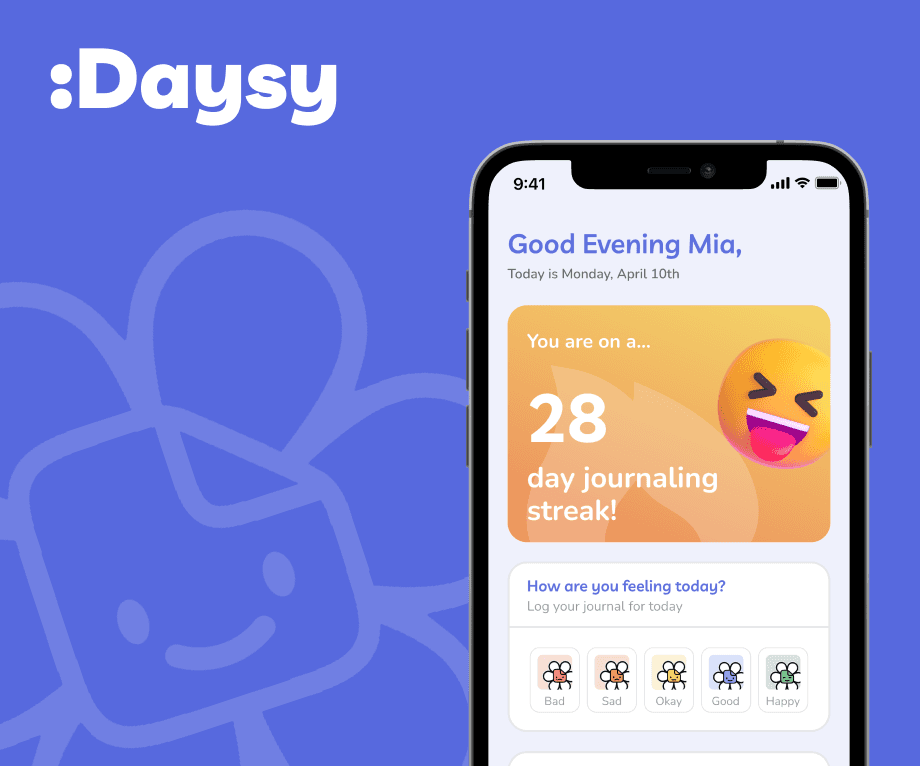
Thumbnail of :Daysy case study.

24-HOUR DESIGNATHON

An emotion journaling app for children with Autism.

Create a free website with Framer, the website builder loved by startups, designers and agencies.